Frequently asked questions
How it works
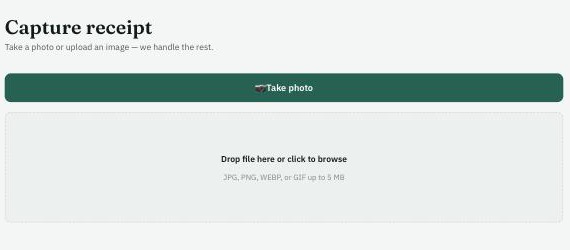
Take a photo or upload an image from the Capture screen — Podupu reads the details automatically.
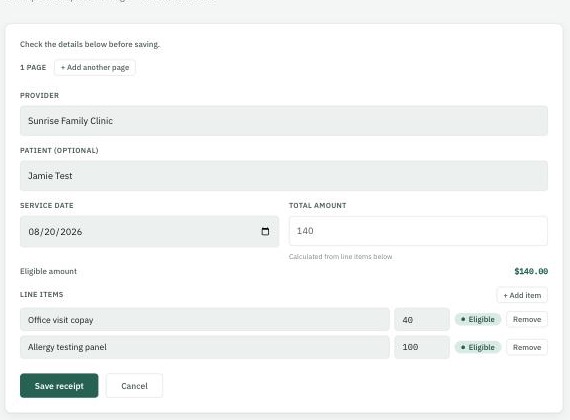
Check the extracted provider, date, total, and line items before saving — fix anything that isn't quite right.
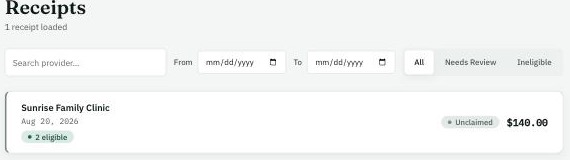
Every line item is checked against your HSA/FSA/LPFSA rules — the receipt list shows what's eligible.
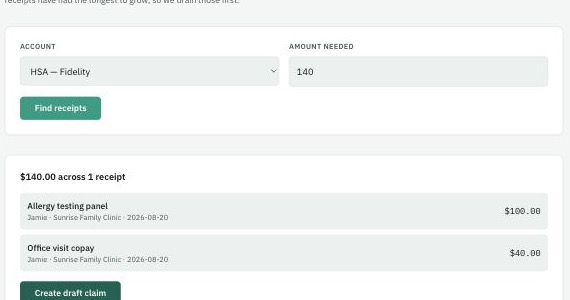
Enter the amount you need reimbursed, and Podupu picks the fewest, oldest receipts to cover it.
Ask: your AI assistant
Ask is a Q&A assistant that answers natural-language questions about your own receipt and spend history — no digging through screens or spreadsheets required. A few things people ask:
- “How much did we spend this year?”
- “Which categories are driving our spending?”
- “What should I review before submitting a reimbursement?”
Ask answers are insights and summaries drawn from your own data — not financial, medical, tax, or eligibility advice. Always double-check anything important before acting on it.
Functionality
What does "Podupu" mean?
Podupu means "savings" in Telugu — the mother tongue of Suman Bukka, one of Podupu's founders. See the About page for more on who's behind Podupu.
How does receipt capture work?
Take a photo or upload an image from the Capture screen. Podupu reads the provider, service date, total, and line items automatically. If a receipt has more than one page, add each page before saving — Podupu combines them into a single record rather than double-counting anything that carries over. If automatic reading fails, you can always enter the details by hand instead.
What does "Needs Review" mean?
Every line item is checked against your household's HSA/FSA/LPFSA eligibility rules. When Podupu can't confidently match an item to a rule, it's marked Needs Review instead of guessing. Open the receipt and choose the correct category yourself — the item then carries the eligibility of whichever category you pick, the same as an automatic match would.
How is HSA/FSA/LPFSA eligibility determined?
Each line item's description is matched against a set of eligibility rules, and each rule knows whether it qualifies for HSA, FSA, and/or LPFSA — an item can be eligible for more than one account type at once. An item that clearly doesn't qualify for any of them is marked ineligible; one that can't be matched with confidence is marked Needs Review instead of being guessed at.
What happens after a receipt is captured?
A captured receipt's line items move through a simple lifecycle: unclaimed, submitted, then reimbursed. You can see where every receipt and line item currently stands from the Receipts and Withdraw screens.
Pricing
Does Podupu cost anything?
Podupu is free to use during our early access period. We may introduce paid premium features or ads in the future to support the product.
Security
How is my household's data kept separate from everyone else's?
Every receipt, claim, and account is isolated at the database level by household — access is enforced there, not just by the app's screens, so one household's records are never reachable from another household's login, even by directly querying the underlying data.
Are my receipt photos private?
Yes. Receipt images are stored privately and are never given a public URL — every time an image is displayed, it's through a link that's generated on the fly, tied to your session, and expires shortly after.
Is my connection to Podupu secure?
Yes — all traffic between your device and Podupu is encrypted in transit (HTTPS), the same standard used for online banking.
Do I need to remember a password?
No. Podupu uses passwordless sign-in: you enter your email and get a one-time link, so there's no password for Podupu to store or for you to reuse from somewhere else.
Compliance
Is Podupu a HIPAA-covered entity?
No. Podupu is a personal tool you use to track and organize your own HSA/FSA/LPFSA-eligible expenses — it isn't a doctor's office, health plan, or insurance clearinghouse, so it isn't a "covered entity" under HIPAA the way those organizations are. We still design and operate the product with the same privacy expectations you'd want from anyone handling health-related information — see the Security section above.
How long do you keep my data?
For as long as your account is active — this is expense-tracking data you may need for years (e.g. IRS recordkeeping on HSA/FSA claims), so it isn't automatically expired. If you delete your account, your data is scheduled for permanent deletion 30 days later; signing back in during that window restores everything.
Can I delete my data?
Yes. You can delete your account at any time from Account settings. This starts a 30-day window before your data is permanently and irreversibly deleted, giving you a chance to change your mind by signing back in.
Do you sell my data?
No. Your data is never sold, and it isn't shared with third parties for marketing purposes.
Is my receipt data used to train AI models?
No. Podupu uses an AI provider to read details off your receipt images automatically, but that data isn't used to train any AI model.